Monday, January 17, 2011

How to play FIFA 08/09/10 online through hamachi

FIFA series is one of the popular online games.We can play FIFA 08/09/10 online through means of a VPN software known as LogMeIn Hamachi.Hamachi is a VPN software which creates a virtual LAN between two computer users which helps connecting the users in LAN and playing through it.


  • You can download the Hamachi client here
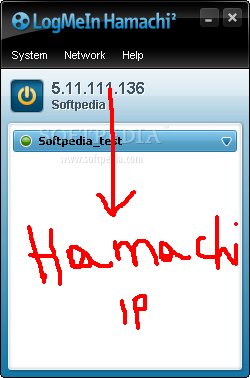
  • After downloading and installing the Hamachi,you have to configure it to get your virtual hamachi IP address.


  •  After that click on the Power button on the top of the client just below the Menu.


  • With that you will get you Hamachi IP Address like (5.x.x.x).This is only used for hamachi purpose and is no way related to your Original IP address.


  • After this you can play the games in Hamachi by joining an existing network / creating your own network.

  • After joining in the networks you can play with any one of the members existing in your network.To play the game,just open your FIFA08/09/10.exe.
  • Then in the Main Menu>Game Modes>Multiplayer.
  • Go to Direct IP>Ur name and IP

  • Then click on New and add the opponents name and IP address.Click OK.


  • Now , you can see your opponents name and hamachi IP on your right hand side of the screen.
  • Now , you can connect/host to ur friends IP address and enjoy the beautiful game!!
I Hope this tutorial was useful to some of you!!See you again with new post!!

Au Revoir!!


How to play FIFA 08?-Tutorial Part-V

So in the previous posts we have crossed all the basic gameplay forms in FIFA 08.We will peep out into the Tips and Tricks and Tactics in detail.


Tips and Tricks-Attacking and Defending

  • When you are in the possession, hold Q and press W + DK to lob the ball over to the attacker.The attacker will time his run and can easily score goals in this way.This needs a bit of practice and this will be useful especially when your opponent is  playing an offensive tactic(will cover in later posts).This is generally a long ball strategy.
  • You can play 1-2 pass with the players by holding Q and pressing S+DK and pressing S button again.This is mainly useful to beat the opponent or to lose an opponent.
  • Whenever you are 1 on 1 with the goal keeper,just press Q and D + DK to lob the ball over the goalkeeper.
  • Advance Crossing - Whenever you have possession press A twice along with DK button for low cross.This is mainly useful whenever there is more space or less players around the receiving end.To make an early cross just hold Q and press A twice + DK.
  • You can play disguised pass by holding C and pressing S + DK,disguised throughball by holding C and pressing W +DK,disguised shot and lob by pressing D + DK and A + DK respectively.
  • You can play a fake shot by pressing D and then immediatly pressing S + DK.You can feel the opponent defenders and goalkeepers easily if you master this skill.
  • When you are defending,just press Q and E along with the DK.This will press the opponents and will make a quick conservative tackles.You can also press S to change the players,D to make a standing tackle and A to sliding tackle.
Tips and Tricks-Dribbling
Dribbling is the most exciting aspect in the real football and also in the gaming.It requires huge control over the keys and anticipation to succesfully move out the dribbling moves over the opponent(especially VS human opponent).Here are the various dribbling moves involved in FIFA 08.
  • To make a normal over step dribbling just press the forward button(DK) then releasing the button hold Shift and press the forward (DK) button twice.
  • To make a Sidestepping Dribbling just hold Shift button while tapping L + R or R + L.
  • To make Ronaldinho Elastico, hold on to Shift button while tapping L + F + R or R + F + L.
  • To make Zidane Roulette, hold on to Shift button while tapping B +L + F or B + R + F.
  • To make Flick, hold on to Shift button while tapping B + F.
  • To make a Rainbow Flick, hold on to Shift button while tapping L +B + R or B + R + L.
  • There is a certain Rabona which I am not quite sure about.Will update soon in this blog. ;)
Tips and Tricks-Tactics
Tactics also play a huge role in improving your game play.The tactics make FIFA 08 look more realistic as the players react to the situation as you command them to do.These tactics are defined into 2 categories :  Offensive and Defensive Tactics.

Offensive Tactics
  • NumPad 8 - Counter Attack(CA).
  • NumPad 6 - Wing Play(WP).
  • NumPad 6 - 3rd Man Release(MR).
  • NumPad 2 - Box Overload(BO).
Defensive Tactics
  • NumPad 8 - Pressing(PR).
  • NumPad 6 - Offside Trap(OT).
  • NumPad 4 - Flat Back(FB).
  • NumPad 2 - Zonal Defending(ZD).
We will look deep into these tactics in the next post.Stay tuned untill then..Au Revoir!!


Saturday, January 15, 2011

How to play FIFA 08?-Tutorial Part-IV

INDIRECT FREE KICKS(CORNERS)


  • Press E and then the DK to change the kick taking player.
  • Press A to cross the ball inside the box.
  • Press C to call the second player and S to pass the ball to lay off player.
  • Press D or Q + D to shoot the ball into the box.You can curl the ball by quickley pressing Shift + DK.
  • To Defend a Corner,press S to control the right player and press W (to call the goal keeper) and D+DK to clear the ball with defender.
THROW-IN
  • Throw in are one of the effective set pieces which when used in a right way may give some problems to the opponent.
  • First, you can  directly select the opponent by using Q and throwing by using S.After that pass the ball and dribble through the opponents.
  • Another way is to pass the ball and cross directly to the free player or into the box.
  • Second way is,change the player control by using Q and lock the player by using D.After that you can trick the opponents by changing the player control and passing to the player.
PENALTY KICKS
  • Penalty kicks are the easiest way to score goals.To score the penalties just press D key(shoot key) along with the direction button(D + DK).
  • Press Q + D + DK to shoot a finesse shot.
  • Beware,if you hold the direction button too long you may miss the target.
  • When you are GK,you can anticipate the strikers move and force a save by pressing A or D button along with the DK buttons.
  • Press Shift + UP/DOWN button to make the GK perform 'Dudek Dance' or 'Position Stance'.

How to play FIFA 08?-Tutorial Part-III

FREE KICKS

Free Kicks are divided into two types.They are : indirect and direct freekicks.

DIRECT FREE KICKS
  • To kick the ball use D key.
  • With combination Q + D you can kick the ball with more power on surface.
  • Press S to pass the ball and A to lob the ball.
  • Press E to change the kick taker.
  • Move the directions using the DK button and shoot the ball with enough power on the power meter.This needs a bit of practice.
INDIRECT FREE KICKS

  • Press C to call the Lay-Off man.
  • Press C + S to pass the ball by the lay-off player.
  • To shoot the ball with lay-off player,press C + D + DK.
  • To confuse the defenders by making a dummy shot,press Z + D + DK.
DEFENDING FREE KICKS
  •  When you defend a free-kick you can press W to make the wall jump. You can also press D to let a player from the wall run towards the kick-taker before the ball is kicked but after the whistle has blown.
  • You can control the keeper by pressing the Shift Key.

Friday, January 14, 2011

How to play FIFA 08?-Tutorial Part-II

In the previous post(click here) you came across the introduction to the basic controls usedin FIFA 08.Now,we will see how to use those keys in attack,defence and to control the Goal Keeper.


Attacking Controls(Keys to use in attack)           
  • Press DK buttons for initiating the player runs.
  • Press Q + DK buttons to activate the player runs around the player under control.
  • Press W+ DK to play a Through ball.
  • Press E to Sprint.
  • Press A + DK buttons to Lob Pass/Cross the ball/perform a sliding tackle.
  • Press D + DK to perform a Shot/Clearence.
  • Press Z + DK to perform a Dummy move.
  • Press C + DK for pace control move.
  • For Dribbling,just move along the DK holding the Shift Key.

Defending Controls(Keys to use in defence)
  • Use Q + DK for calling defending by calling the second player.
  • We can also use Q for pressing the opponent when you are not in the possession.
  • Use C to slow down  and C + D + DK for tackling by standing on ground.
  • Press S to control and switch to other players.
  • Press A + DK for performing a sliding tackle.

Goal Keeper Controls(Keys to be used for GK control)

  •  When the goalie holds the ball, press S to pass the ball. 
  • Press W to put the ball down. 
  • Press A or D to kick the ball.
  • Press Shift to change the control to keeper.
  • Hold W to rush your keeper forward.
In the next installement we will see how to take the set pieces like Free Kicks,Throw-In's,Corners,etc;

Au Revoir!!

How to play FIFA 08?-Tutorial Intro


Introduction to FIFA 08 


FIFA08 is the first real time Simulation based football video game from EA SPORTS.Previously,arcade football gaming ruled the routes , but with introduction of 08,there was a huge turn around in the gaming industry which changed the course of the football simulation gaming.


So, folks if you are a PES(Pro Evolution Soccer) fan please back up..and get outa here...coz this is the stuff for the FIFA 'ers!! :xD.


CONTROLS


Before going into the topic first get used to the controls.FIFA is a very complex game which demands a great deal of concentration and attention as you need to stretch your fingers all over the keyboard and actually PLAY the game,so its necessary for the begginers to get used to the controls.Lets have a look at the controls now.


DK = Directional Keys (Up, Down, Left, Right Arrows)
L = Left (refering to the position of the player: the left of the player)
R = Right (the right of the player)
F = Forward (the direction the player is facing)
B = Backward (the opposite of forward)
 (L, R, F, B are just directions, use DK to move your player in these directions)DK = Directional Keys (Up, Down, Left, Right Arrows)

Q = Call 2nd player/Player Runs ( You can Indirectly control the player runs)
W = Through ball/Goal Keeper Rush ( You can make a through pass for the ball / You can rush the goal keeper under critical situation i.e  when you are one on one with the striker)
S = conservative pass
D = shoot/standing tackle
A =  lob/conservative tackle(sliding tackle)
E =  sprint/run
C =  pace control/Cancel new move
Z = Dummy
Shift = GK control/Trick button

These are the basic controls for FIFA ' ing. So in the next posts we will see the effective way of playing FIFA in aggresive way!!

Keep Rollin!1

Welcome!!

Hello Folks....This is Subramanyam Upadhyayula...and this is my first post in my new blog.

I am gonna post about several online games here and how to play the games online.

Basically there are many kind of online games.But the ones which are quite famous are

1.Counter Strike , Counter Strike Condition Zero
2.WarCraft III, Defence of The Ancients (DoTA)
3.EA SPORTS FIFA series.

SO I AM GONNA POST ABOUT ALL THESE GAMES AND HOW TO PLAY THESE ONLINE.!!!